Paste SQL, get an ER diagram and a data dictionary
ErdDocs is a free ER diagram generator that starts from what you already have: it turns a SQL dump, a Prisma schema, or framework migrations into an interactive ER diagram and a printable data dictionary — every table, column, type and relation. No signup, no install, and the schema is parsed in your browser, so it never leaves your device.
- SQL
- Prisma
- DBML
- Mermaid
- PlantUML
- Django
- SQLAlchemy
- Sequelize
- TypeORM
- Laravel
- what each one gives →
Nothing is uploaded. Your schema stays in this browser: the last one you pasted is restored when you reopen the tab, and clearing your site data removes it.
How it works
To turn a SQL dump into an ER diagram and a data dictionary:
- 01Export your schema —
pg_dump --schema-onlyfor PostgreSQL,mysqldump --no-datafor MySQL. - 02Paste it above, or drop the .sql file straight onto the panel.
- 03Read the diagram: hover a table to light up its relations, click to pin them, click a long table to see every column.
- 04Switch to Data Dictionary for the written reference — every column, type, default, index and relation — and print it to PDF.
Built for real dumps
A production schema is not a tidy list of CREATE TABLE statements, so the parser is tested against real ones — pagila, sakila, GitLab, Discourse, WordPress, PrestaShop.
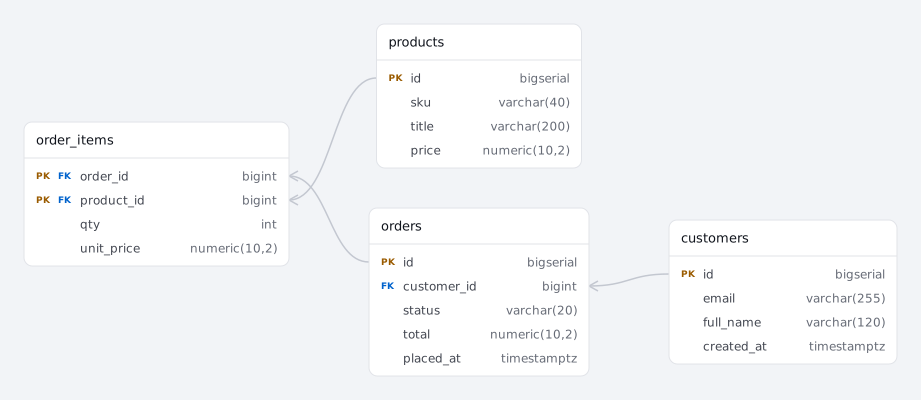
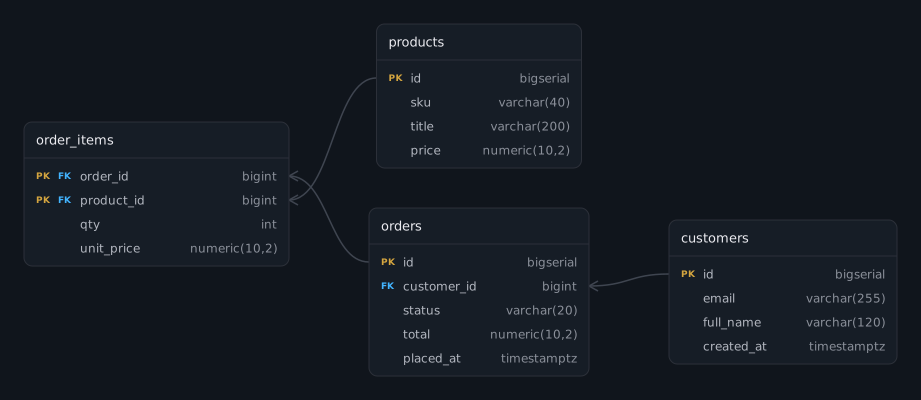
- Partitioned tables stay one table. A dump with 55 monthly partitions of
paymentdraws a singlepaymentcard, not 56. - Missing foreign keys are recovered. Rails and Django projects often declare none in the database; column names still say what points where, and those relations are drawn dashed.
- One bad statement does not sink the file. Anything unreadable is skipped and reported; the rest of your schema still renders.
- Large schemas are never truncated. Everything you paste is parsed and laid out, including schemas with hundreds of tables.
Why ErdDocs
- Documentation, not just a picture. A data dictionary is what auditors, clients and new hires actually ask for.
- No signup, no install. No account before you see the result, and no package to add to your project.
- Pay once. A one-time price instead of a per-seat subscription you forget to cancel.
- Private by design. Parsing runs locally in your browser — production schemas stay on your machine.
Convert between formats
ErdDocs reads ten formats and writes eight, all in the panel above. These pages take one route each, with an example already loaded:
- Prisma schema to ER diagram — the database
schema.prismagenerates, join tables and all. - DBML to ER diagram — dbdiagram’s language, plus the printable dictionary it has no view for.
- SQL to PlantUML — a dump as
.puml, with no JVM and no Graphviz. - Mermaid ER diagram generator —
erDiagramtext for a README, from any of the ten inputs. - DBML to Mermaid — converted with the diagram beside it, so you can see it went right.
- SQLAlchemy models to ER diagram — Python models without pip or Graphviz.
- Sequelize models to ER diagram — including the keys your associations imply.
- Prisma schema to SQL —
CREATE TABLEwithout installing the CLI. - Django models to ER diagram — the tables Django creates, without Graphviz.
- TypeORM to ER diagram — entities pasted as text, with the junction table they build.
- Prisma to DBML — for dbdiagram and dbdocs, with the diagram beside the output.
- Prisma to PlantUML —
.pumlwithout a CLI or a generator block. - MySQL ER diagram generator — a mysqldump file, without installing Workbench.
FAQ
What is a data dictionary?
A data dictionary is a readable reference document for your database: every table, column, data type, nullability, default value, index, and relationship, described in one place. Teams use it for onboarding, audits, and client handover, and ErdDocs generates one from a schema you paste, ready to print.
Does my schema get uploaded anywhere?
No. Parsing and rendering run entirely in your browser. Your SQL never leaves your device, and there is no account to create. The site counts page views with a cookieless analytics beacon, which sees the page you opened and nothing that is in it.
Which databases and formats are supported?
PostgreSQL and MySQL dumps, including pg_dump output with ALTER TABLE ONLY ... ADD CONSTRAINT statements. Nine more inputs are read as-is: Prisma schemas (with @map names, relation fields and implicit many-to-many join tables resolved to the tables the database actually gets), DBML, Mermaid erDiagram, PlantUML, Django models, SQLAlchemy models, Sequelize models, TypeORM entities and Laravel migrations. The format is detected from what you paste, and you can override the guess.
My dump has no foreign keys. Will the diagram be empty?
No. Rails, Django and Laravel projects often enforce relationships in application code rather than in the database. ErdDocs reads the naming convention as well, so a user_id column links to the users table. Relations matched by name are drawn as dashed lines so you can tell them from keys the database declares.
How is this different from dbdiagram, drawSQL or sqltoerdiagram?
ErdDocs starts from a schema you already have: it reads ten formats (SQL dumps, Prisma, DBML, Mermaid, PlantUML, Django, SQLAlchemy, Sequelize, TypeORM, Laravel migrations) and produces the part the others leave out — a printable data dictionary — plus exports back out as SQL, Mermaid, DBML or PlantUML. Parsing runs in your browser, there is no account, and a large schema is one payment rather than a subscription. The tools it gets compared with stop at different points: dbdiagram and drawSQL are drawing tools, where you write DBML or arrange tables by hand, in an account, on their servers, which is the right shape when the schema does not exist yet; sqltoerdiagram is a free converter and stays free, so if all you want is a picture from a dump, it gives you one with no paywall. ErdDocs draws that diagram too and documents the schema behind it, which is also why it deliberately does not connect to a live database or let you draw a diagram by hand: the schema you export yourself is the one it documents, and it never leaves your machine.
What does it cost?
Viewing diagrams and exporting images is free, with no account. Schemas up to 25 tables render in full. Larger schemas are parsed completely and the extra tables appear as locked placeholders until you unlock them with a one-time $9 payment, which also includes the data dictionary: every table, column, type, default, index and relation as a printable document. Prices exclude VAT and sales tax, which Paddle adds at checkout where they apply.