Database diagram tool
A database diagram tool that reads the schema you already have. Paste a dump, a Prisma schema, migrations or ORM models and get an interactive diagram plus a data dictionary — ten formats in, no database connection, no account, and nothing uploaded: the parser runs in your browser.
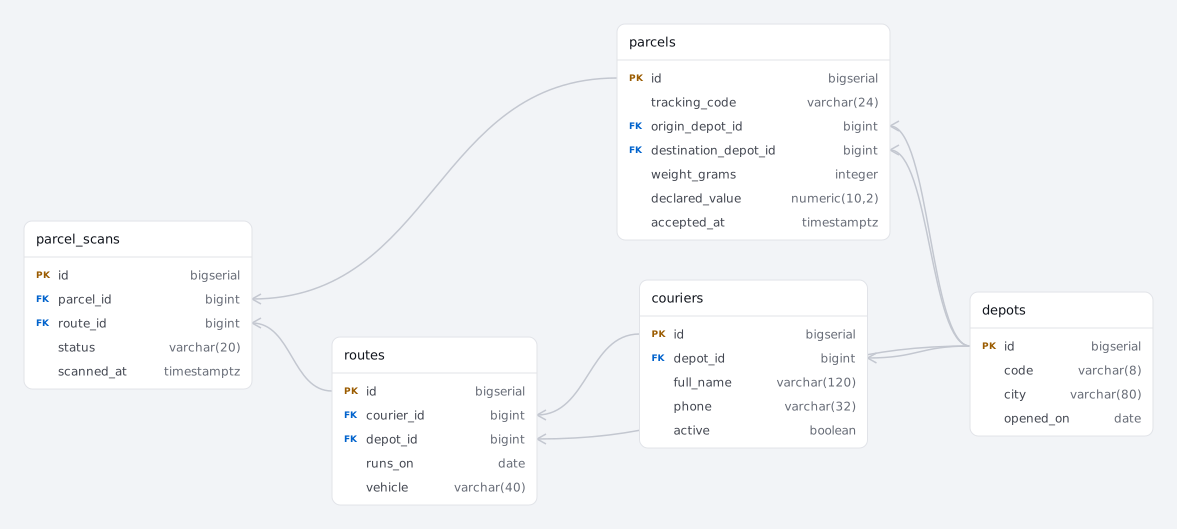
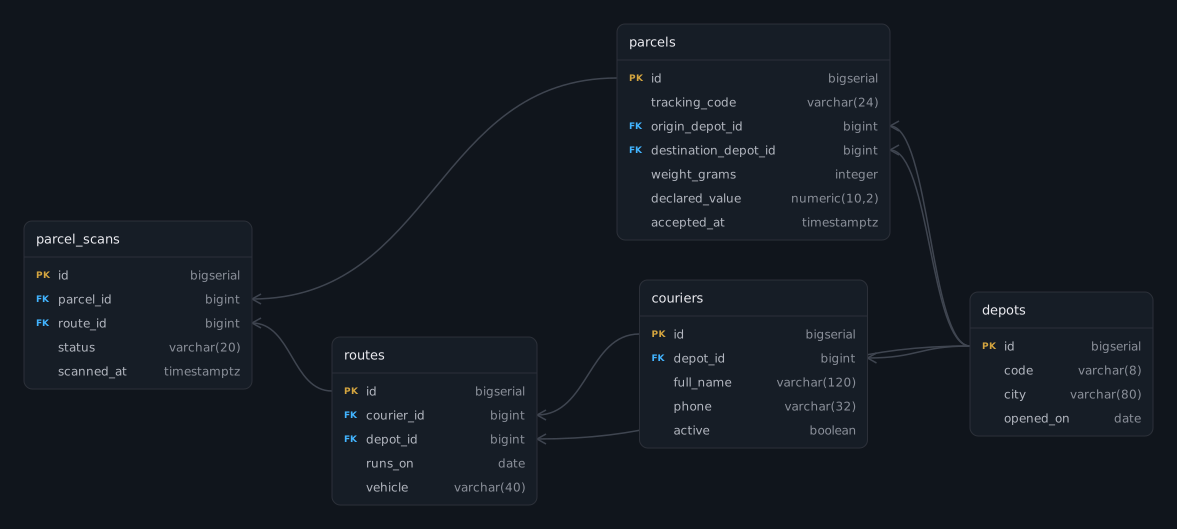
A parcel network, generated from the SQL on the left. Paste your own schema over it.
What is a database diagram?
A database diagram is a map of the tables in a database: one box per table listing its columns and their types, with lines showing which column points at which table. Where the textbook term is entity-relationship diagram and comes with a notation lecture, “database diagram” is the everyday name for the same picture — and it is usually wanted for a database that is already running, not one being designed.
The same thing is also called a database schema diagram, a database schema maker, a database schema visualizer or simply a db diagram tool. They are not different products: every one of those names describes drawing the tables a database already contains, which is what this page does.
That is the case ErdDocs is built for, and it generates rather than draws: the diagram is derived from the schema text, so it says exactly what the schema says, and regenerating it after a migration costs one paste.
Three steps, and none of them is a connection string
- 01Get the structure. For PostgreSQL,
pg_dump --schema-only mydb; for MySQL,mysqldump --no-data mydb. If the database is defined in code instead, the model files or the migrations folder are what you already have. - 02Paste it into the panel above, or drop the file onto it. The format is detected as you paste — SQL, Prisma, DBML, Mermaid, PlantUML, Django, SQLAlchemy, Sequelize, TypeORM or Laravel — and the diagram appears while the schema is read.
- 03Take it away. Export PNG or SVG for a document, Mermaid or DBML for a repository, PlantUML for a UML toolchain, SQL for a rebuild — or open Data Dictionary and print the whole schema as a document.
Why paste a dump instead of connecting to the database?
A database connection is not needed to draw a database diagram, and skipping it is deliberate. Every tool that offers one asks for a host, a port, credentials and — in any serious environment — a firewall rule and a ticket to get a read-only user created. A schema-only dump takes one command and produces a file you already have the right to read. Skipping the connection also means the schema stays yours: the parser is JavaScript running on your machine, so nothing is uploaded and no account holds a copy of your table names. That matters more than it sounds, because table and column names are precisely what an attacker wants for reconnaissance, and precisely what an NDA covers when the database belongs to a client.
What a real database looks like, and what breaks tools
The parcel-network schema on this page was written with the shapes an inherited database actually has, because those are the ones that decide whether a database diagram tool is useful on day one:
- Two keys into the same table —
origin_depot_idanddestination_depot_idboth point atdepots, and they must be drawn as two lines rather than collapsed into one. - An append-only event table —
parcel_scansis the biggest table in the database by a wide margin and the one no design document ever mentions. - A nullable relationship — a scan may have no route yet, so the line reads “zero or one” on that end. The crow’s foot marks carry that distinction; an arrow would not.
- Relations that exist only by convention — in a schema whose foreign keys were never declared, column names are the remaining evidence. Those edges are drawn dashed and can be switched off entirely, so the diagram never claims the database enforces something it does not.
A diagram is half the documentation
A picture answers what points at what. It does not answer what status is allowed to contain, which column is generated, what a comment on the table said, or which tables have no primary key. The same paste also produces a data dictionary: every table on its own page with columns, types, defaults, indexes, constraints, allowed values, load and delete order, and the diagram as a figure — printable to PDF from the browser.
That is the artifact a handover, an audit or a new teammate asks for, and it is the reason ErdDocs is a documentation tool rather than a picture generator. See database documentation tools for how the wider landscape compares.
FAQ
What is the best database diagram tool for a database that already exists?
One that reads the schema instead of asking you to redraw it, and reads it from a file rather than a live server. Paste a dump, a Prisma schema, migrations or ORM models here and ErdDocs generates the diagram in the browser — free for schemas up to 25 tables, with no account, no credentials and no connection to the database. Designing a database that does not exist yet is a different job, covered on the ER diagram tool page; for a database that already exists, ErdDocs needs nothing but its schema text.
Does it connect to my database?
ErdDocs never connects to a database, and that is a design decision rather than a limitation. There is no connection form, no host and no credentials: the parser is JavaScript running in your browser, and it only ever sees the text you paste, so table and column names never leave your machine — which matters more than people expect, since schema names are exactly what an attacker wants for reconnaissance and exactly what an NDA usually covers. It is also the faster route: getting a read-only user provisioned in a production network takes longer than running a schema-only dump and pasting the result.
What can it read?
Ten formats: PostgreSQL and MySQL dumps, Prisma schemas, DBML, Mermaid, PlantUML, Django models, SQLAlchemy models, Sequelize models, TypeORM entities and Laravel migrations. Detection is automatic. For SQL, dump the structure only — pg_dump --schema-only or mysqldump --no-data — so no row of data is involved at any point.
My schema has no foreign keys. Will the diagram be a wall of boxes?
No. Relationships are also recovered from column naming, so a parcel_id column links to the parcels table, and those edges are drawn dashed to keep them distinct from keys the database actually declares. Rails, Django and Laravel projects frequently enforce relations in application code only, and their diagrams are unreadable without this step.
Can I get documentation as well as the picture?
Yes. The same paste produces a data dictionary: every table, column, type, default, index, constraint and relationship as one printable document, with the diagram as a figure on its title page. A picture answers “what points at what”; a dictionary answers “what is this column and what values does it take”, which is the question a handover or an audit actually asks.
Is it free?
Diagrams up to 25 tables render in full for free, with no account, and PNG, SVG, Mermaid, DBML, PlantUML and SQL exports are free too. Bigger schemas are parsed completely — tables past the limit show as locked placeholders — and $9 once lifts the limit and unlocks the data dictionary.
Related
- Schema diagram — the same picture under the name developers use for it.
- ER diagram tool · What is an ER diagram — the academic term, and where a generator fits among the drawing suites.
- MySQL ER diagram generator — what a mysqldump file contains, statement by statement.
- Data dictionary generator — the printable document behind the diagram.
- All formats · Example schemas — what can be pasted, and schemas to try it on.
- SQL to ER diagram — the tool with every format it reads.