ER diagram tool
ErdDocs is an ER diagram tool that generates the ERD instead of asking you to draw it. Paste a SQL dump, a Prisma schema, migrations or ORM models, and the entities, their columns and the crow’s foot relationships appear in seconds — free, in your browser, with no account, no install and nothing uploaded.
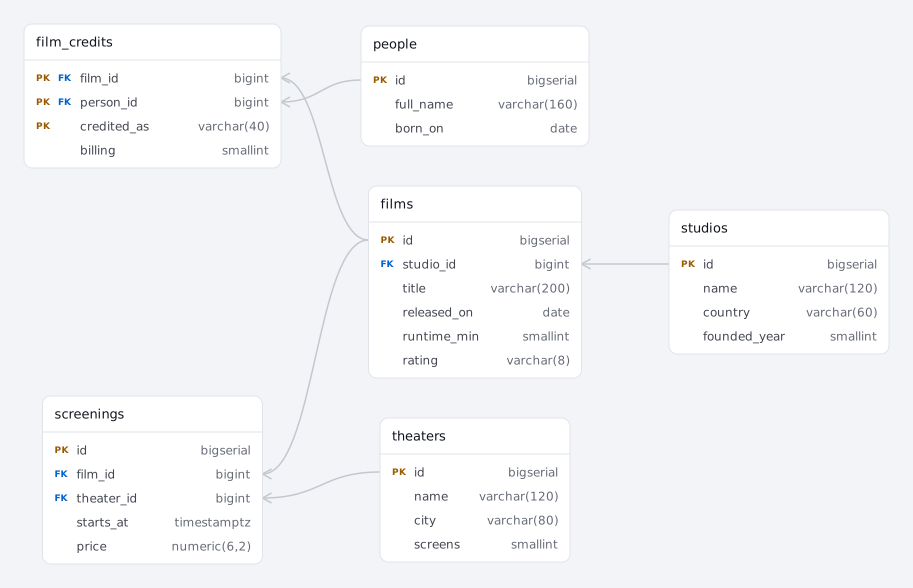
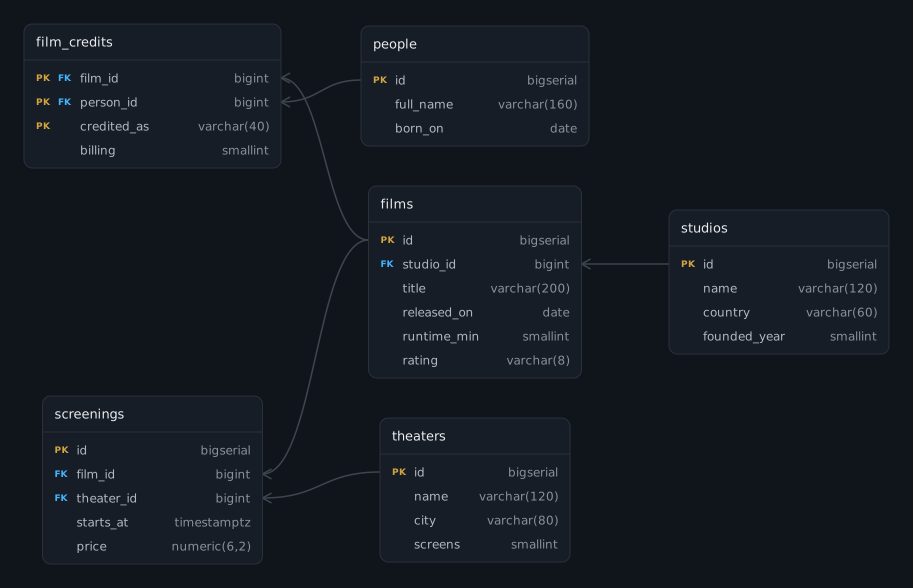
A film catalog, generated from the SQL on the left. Paste your own schema over it.
Is this a drawing tool?
No — ErdDocs derives the diagram from the schema you paste, so there is no shape palette, no line tool and no canvas to start blank. An ER diagram here is the output of reading a schema, not something you assemble: you paste the text that already describes your database, and the boxes, columns, keys and cardinalities are derived from it. You can still drag tables to arrange them, and the arrangement travels in the share link — but no fact on the diagram was typed twice.
That is a real difference from almost everything else that ranks for this search, and it cuts both ways. The next section is about the one case ErdDocs leaves to the drawing tools — a database that does not exist yet.
Draw it, or generate it?
The question is not which tool is better; it is whether the schema exists yet.
- The schema does not exist yet — draw it. ErdDocs reads a schema, so this is the one case it does not cover: a data model gets decided by arguing over shapes — does an order own its address or point at one, is this relationship really many-to-many — and a canvas, or a whiteboard, is the right surface for that argument. Once the argument ends in a migration or a CREATE TABLE, ErdDocs reads it from there.
- The schema already exists — generate it. Once the tables are real, they are already described precisely: in
CREATE TABLEstatements, in a Prisma schema, in migration files, in ORM model classes. Redrawing that by hand is transcription — an hour of work whose only product is a second, less reliable copy of a description you already have.
Among ER diagram tools, ErdDocs is the one built for a database that already exists: the rest of the category is built for sketching one from scratch. Most people searching for an ERD tool already have the schema and reach for a drawing tool anyway, because that is what the search results offer — ErdDocs reads what they already have instead.
Which ER diagram tool reads a schema you already have?
Every tool below draws an ER diagram. They differ in whether you have to draw it yourself, and that is the only question worth asking once the database exists.
| Tool | Reads an existing schema | Best when |
|---|---|---|
| ErdDocs | Yes — ten formats, pasted as text, free without an account | The database exists and you want its diagram and documentation |
| dbdiagram.io | Yes — imports a SQL dump; saving and exporting need an account | Maintaining the schema as DBML code you edit by hand |
| Eraser | Partly — pasted SQL is a prompt for an AI generator | Sketching a model from a plain-English description |
| diagrams.net | Partly — pasted DDL gives tables and primary keys, but no foreign keys at all | Drawing any kind of diagram, free and offline |
| Lucidchart | Partly — you run their metadata query against a live database, not a dump | Team diagramming where an ERD sits beside other charts |
| SmartDraw | Partly — from a CSV of table definitions you extract yourself | Chen or crow’s foot drawing in a general diagramming suite |
| Miro | Partly — through a Mermaid or PlantUML app on the board | Designing a schema together on a shared whiteboard |
| Figma FigJam | No — shapes and connectors, drawn by hand | Designing from scratch with a team |
| Canva | No — templates and drag-and-drop shapes | A presentation-ready graphic of a model you already understand |
Checked against each vendor’s own pages on 27 August 2026. Plans and features change — the links go to the source. Prices are left out on purpose: they change fastest and are the least forgiving thing to get wrong about somebody else’s product.
The honest reading of that table is that dbdiagram is the closest thing to ErdDocs, not the drawing suites: it reads SQL too, and reads it well. Three things differ. It imports SQL dumps, Rails schema files and CSV, where ErdDocs reads ten formats including Prisma, ORM model files and a folder of migrations. It asks for an account before you can save or export, and ErdDocs does not. And it stops at the picture, where the same paste here also produces a written data dictionary.
Why a drawn ERD goes stale and a generated one cannot
A hand-drawn diagram is a snapshot with no link back to the database. The next migration adds a column, renames a table or drops a foreign key, and the diagram keeps showing the old shape until somebody remembers it exists, finds the file, has an editor license and takes the time. In practice that is the week it was drawn and never again — which is why so many repositories carry a diagram that quietly contradicts the schema next to it.
A generated diagram has no version to keep in sync. It is a view of the schema text, so re-running it on the current dump takes seconds, and the answer is right by construction. Practically, that means you can regenerate on every release instead of maintaining a drawing: export Mermaid for the README, SVG for the docs site, or a full data dictionary for the handover — all from the same paste.
What can you paste into it?
Ten formats, detected automatically — you paste the file as it is, and the tool works out what it is looking at:
- SQL — PostgreSQL and MySQL dumps as the servers write them: backticks,
AUTO_INCREMENTand keys declared by a laterALTER TABLEare all read. See the MySQL page for what a dump contains. - Schema languages — Prisma, DBML, Mermaid and PlantUML, which are already diagrams-as-text and only need drawing.
- ORM models — Django, SQLAlchemy, Sequelize and TypeORM classes, plus Laravel migrations. These are the ones that never had a diagram at all, because the database is defined in application code.
The formats page lists every one of them with what is read and what is deliberately skipped.
What does the generated diagram show?
One box per table, columns inside it with their real types, keys marked, and crow’s foot notation on both ends of every relationship — so the diagram states cardinality rather than implying it. In the film catalog above, film_credits is a junction table carrying its own columns, which is how a many-to-many actually looks once it reaches a database.
Relationships the schema never declared are recovered from column names — a film_id points at films — and drawn dashed, so an inferred edge is never mistaken for one the database enforces. That step matters most on inherited production databases, and the database diagram tool page works through why.
FAQ
Is this an ERD maker where I drag boxes around?
No — ErdDocs generates the diagram from a schema you paste, so there is no shape palette and no line tool, and that is deliberate. You can still drag tables to arrange the layout, and the arrangement travels in the share link, but nothing is drawn by hand — every box and every line comes from the SQL.
Should I draw the ERD by hand instead of generating it?
ErdDocs generates the ERD once the tables are real — that is its whole job, and it is the case most people are actually in, because the schema usually exists before anyone asks for a picture of it. The one case it skips is a database that has not been built yet: sketching entities on a canvas is how a data model gets argued about before anyone writes a migration, and general-purpose drawing tools cover that instead — once the sketch becomes a migration or a CREATE TABLE, paste it here and the diagram comes from the schema itself.
What can I paste into it?
Ten formats: PostgreSQL and MySQL dumps, Prisma schemas, DBML, Mermaid, PlantUML, Django models, SQLAlchemy models, Sequelize models, TypeORM entities and Laravel migrations. Format detection is automatic — paste the file as it is, no cleanup and no export step first.
Do I need an account, an install or a database connection?
None of the three. The parser is JavaScript running in your browser, so there is no server to connect to and no schema to upload: table and column names never leave your machine. Open the page, paste, and the diagram is there.
What happens when the schema changes?
You paste the new dump and the diagram is regenerated in seconds. That is the practical difference from a drawn ERD: a drawing has to be edited by whoever remembers it exists, so it starts drifting from the database at the next migration, while a generated one cannot drift because it is derived from the schema every time.
Is it free?
Yes for the diagram: schemas up to 25 tables render in full with no account, and PNG, SVG, Mermaid, DBML, PlantUML and SQL exports are free. Larger schemas are still parsed completely — the tables past the limit appear as locked placeholders — and $9 once lifts the limit and unlocks the data dictionary.
Related
- What is an ER diagram — the concept, and how to read one.
- Database diagram tool — the same tool, phrased for people looking at a database rather than a model.
- Schema diagram · ER diagram symbols — what the shapes and line ends mean.
- Example ER diagrams — worked domains, each with the SQL behind it.
- ERDPlus alternative — an honest comparison with a drawing tool.
- SQL to ER diagram — the tool with every format it reads.